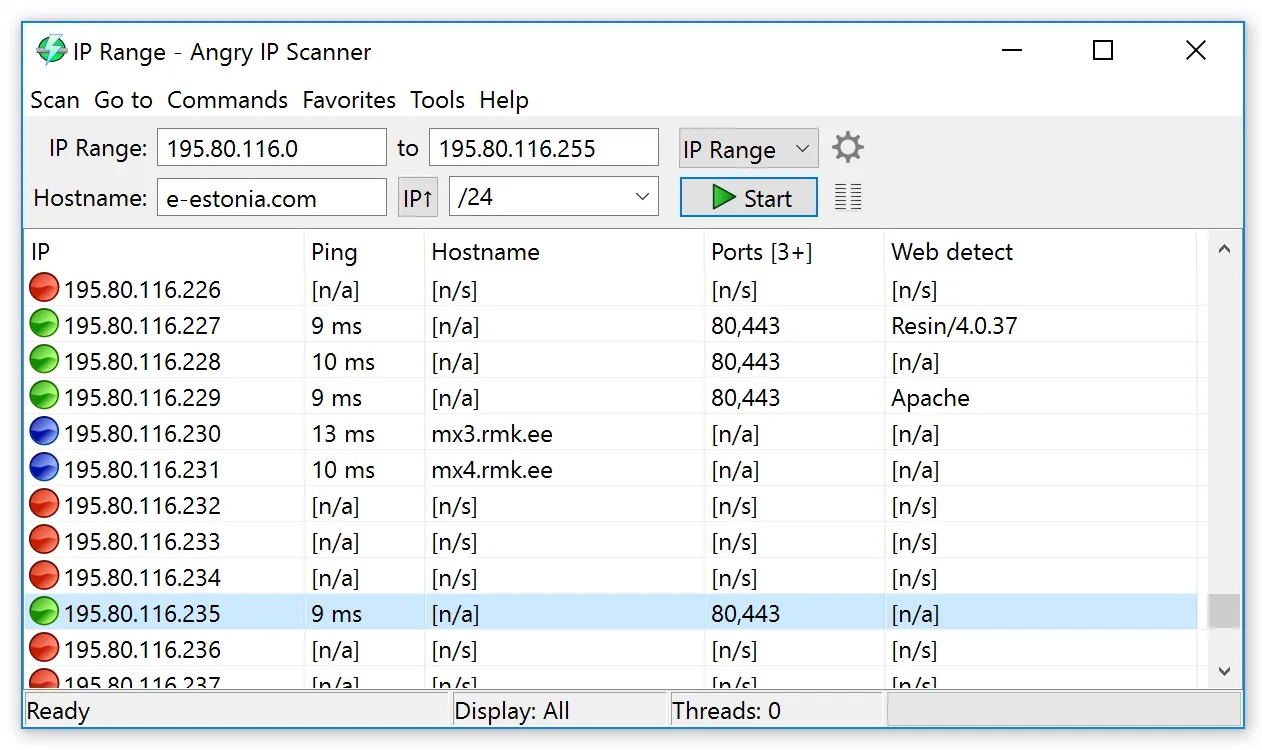
Power came back to the building at 06:40. The core switch is up, the UPS logs look clean, and now you need to know, before the first shift arrives, which of the 180 devices on the office VLANs are answering and which are still dark — a printer that never rebooted, an access point stuck in a boot loop, a NAS that needs a human to press a button. A list of responding hosts, produced in under a minute, is the evidence you want. Angry IP Scanner is one of the quickest ways to get it on a network you administer.
Use with authorization only: scan only networks you own or have explicit permission to scan.
What Angry IP Scanner does
Angry IP Scanner, written by Anton Keks and licensed under GPLv2, is a multi-threaded IP range scanner. You give it a range (10.20.0.1 – 10.20.3.254), a subnet with netmask, a random sample, or a list from a text file, and it probes each address in parallel. For every host it can report:
- Alive or dead, using ICMP echo, UDP or TCP probes, with a combined mode for hosts that ignore ping.
- Round-trip time of the answering probe.
- Hostname via reverse DNS or NetBIOS.
- Open ports from a list you choose, for example
22,80,443,445,3389,9100. - MAC address and NIC vendor on the local segment, plus fetchers for NetBIOS details and web server banners.
Results sit in a sortable table and can be exported to CSV, TXT, XML or a list of IP:port pairs. You can save favourite ranges, and “openers” let you launch a browser, SSH, RDP or any command against a selected host with one click.
It is a Java application. The current release at the time of writing is 3.10.0, from August 2026; it requires Java 21 or newer and bundles a runtime in the Windows and macOS packages, so you don’t need a separate JRE there. It uses Java virtual threads for scanning by default, now shows only alive hosts in the results list by default, and runs natively on Apple Silicon. Builds exist for Windows (32- and 64-bit), macOS (ARM and Intel) and Linux (DEB, RPM or a plain JAR); the standalone Windows executable and Linux builds expect a 64-bit OpenJDK 21+.
Where it’s strong: minutes from question to list
The speed is the point. Scanning a /24 for liveness usually completes in seconds; a few /22 blocks take a little longer depending on timeouts and thread count. Export the “alive” list before and after a maintenance window, compare the two with diff or a spreadsheet, and you have a precise answer to “what didn’t come back?” — the workflow our guide on checking which hosts came back after an outage walks through step by step.
- Cross-platform. The same tool on a Windows help desk PC, a Mac and a Linux jump host, with the same export format.
- Port columns as a service check. Adding 3389 or 443 tells you not just “the host pings” but “the service is listening.”
- Portable use. The standalone Windows executable and the JAR run without an install step, useful on a technician’s USB kit.
- Plugins for custom fetchers, if you need to pull an extra value per host.
Where it falls short, and who should skip it
It is a point-in-time scan, not monitoring. It keeps no history and sends no alerts; for continuous reachability, a tool like SmokePing or a proper monitoring system fits better.
Liveness is only as good as the probe method. Hosts with a local firewall that drops ICMP will look dead under ping-only settings; switch to combined or TCP probing with ports the host is known to answer on. MAC and vendor data only appear for hosts on the same Layer 2 segment as the scanner.
It won’t enumerate Windows shares or check access rights on them — if that is the question, LizardSystems Network Scanner is built for it. And it’s not a vulnerability scanner or an inventory system: no OS fingerprinting depth, no software inventory, no SNMP asset data.
Finally, network scanning can trigger IDS alerts and alarm other teams. Coordinate with whoever owns security monitoring before sweeping large ranges, even on your own network.
Who it suits
- Admins who need a fast, free, cross-platform liveness and port check for subnets they manage.
- Field technicians and MSP staff verifying a site after a power event or switch replacement.
- Mixed Windows/macOS/Linux teams that want one tool and one export format.
Licensing and cost
Angry IP Scanner costs nothing: it is open-source software released under the GNU GPL v2, with no paid tier, and commercial use is permitted under the licence terms. Source is on GitHub (angryip/ipscan).
How it compares
The closest alternative here is LizardSystems Network Scanner, a Windows-only tool that focuses on shared resources and access rights rather than ports. For a process-level view on a single Windows host, TCPView is the complement. And once you know which host is unreachable, PingPlotter or mtr shows where the path breaks. Browse the host and connection checks category or the latency and path analysis category for related tools.
Getting it safely
Obtain Angry IP Scanner from angryip.org or the project’s GitHub releases. Because scanners are popular targets for repackaging with unwanted extras, avoid mirror sites and bundles. GitHub release assets can be compared against the checksums GitHub displays, and on Linux you can verify packages with your package manager before installation. Our where to get it page has the full checklist, and our methodology explains how we research each tool.
FAQ
Why does a host that is clearly online show as dead?
It probably drops ICMP. In preferences, change the pinging method to TCP or combined UDP+TCP, or add a port the host is known to answer on, and rescan.
Do I need to install Java?
Not for the Windows and macOS packages, which bundle a runtime. The standalone Windows executable and the Linux builds require a 64-bit OpenJDK or Java 21 or later.
Can it scan IPv6?
Range scanning is built around IPv4. Version 3.9.3 improved recognition of IPv6 addresses and FQDNs in imported lists, but sweeping an IPv6 /64 is neither practical nor what the tool is designed for.
Is it safe to use at work?
On networks you administer and with your organization’s approval, yes. Scanning networks you don’t own or aren’t authorized to test can breach policy or law.